
Please come to our office during one of the times listed below to submit your passport, and inform the staff that you have chosen Type B service.
I. Passport drop-off and pick-up location & hours:
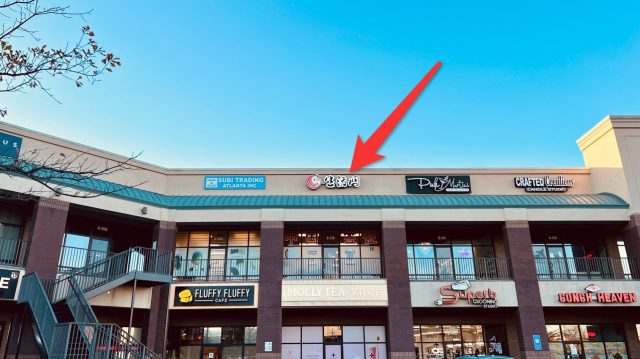
- Address: 6035 Peachtree Rd, Ste C210, Doraville GA 30360
(H-Mart plaza, Molly Tea upstairs) - Hours:
– Monday, Wednesday, Friday: 10:00 am – 12:00 pm & Saturday: 2:00 pm – 4:00 pm (Walk-ins, no appointment needed)
– Tuesday & Saturday mornings only accept appointments
II. Documents required for a Chinese visa application (DIY Service Type):
- A printed and fully completed cover page (click here to download GCV-ChinaVisa-DIY-Coverpage).
- The applicant’s original valid passport.
- Previous visa / passport (if applicable):
3a. If the applicant has a previous Chinese visa that is still valid and is contained in an old passport, the original old passport must be submitted.
Please use a sticky note to clearly mark the page containing the valid visa.
If the previous visa has already expired, submission of the old passport is not required.
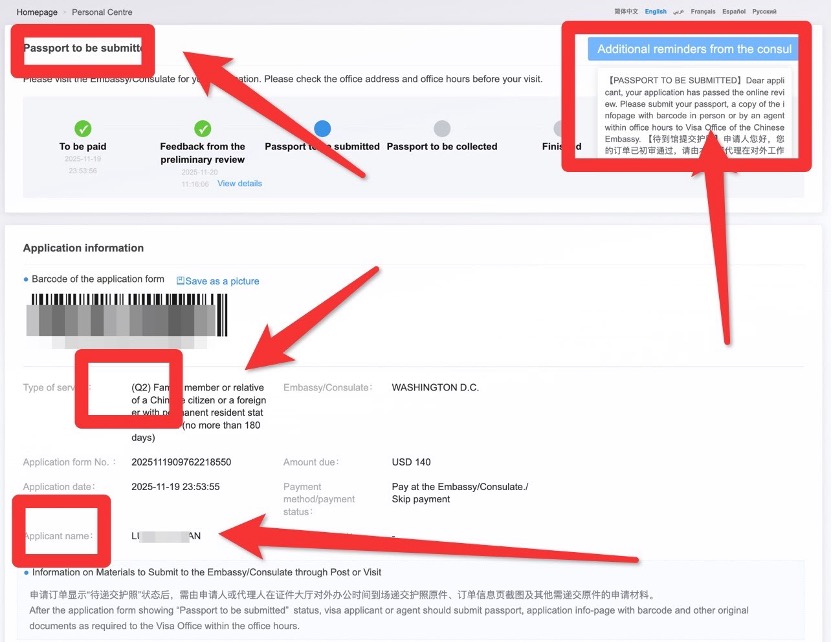
3b. For former Chinese nationals applying for a Chinese visa for the first time, submit the original last Chinese passport (the Embassy will cancel it by corner-cutting), and one photocopy of the Chinese passport information page. - A printed screenshot of the application infopage with the barcode that has passed the Embassy’s preliminary review.
The screenshot must follow the attached sample format and include: “Passport to be submitted” status, “Additional reminders from the consul” with the content box fully displayed, Visa type, and Applicant’s full name.
Important Notes
- Type B (Self-Service) applicants must independently complete the Embassy’s preliminary review.
The order status must reach “Passport to be submitted” before documents can be dropped off to our office. - Before submission, applicants must complete and print:
- the cover page, and
- the preliminary-review-approved screenshot.
If either printed document is missing,GCV reserves the right to refuse acceptance or disqualify the application from Type B discounted pricing.
If any assistances needed from our staff on-site, an extra service fee is required – $5/page for re-printing, and $20/each for log-in and screenshots assistance.
- The “Additional reminders from the consul” in the upper-right corner must be clicked open, showing the full message box before taking the screenshot and printing it.
- If the “Additional reminders from the consul” displays “TO CALL”, please contact us before submitting your documents.
Appendix: How to Capture All Required Information in One Screenshot
- If the required information does not fit on one page, reduce the browser zoom level to fit everything on a single screen.
- Windows:
- Zoom out: Ctrl + –
- Zoom in: Ctrl + +
- Reset zoom: Ctrl + 0
- Mac:
- Zoom out: Command + –
- Windows:
- If the “Additional reminder from the consul” box disappears when moving the mouse:
Use keyboard shortcuts to capture the screen while the message box is visible.- Windows:
After clicking to display the reminder content, press Windows key + Shift + S to use the built-in Snipping Tool. - Mac:
After clicking to display the reminder content:- Press Shift + Command + 3 to capture the entire screen, or
- Windows:
Press Shift + Command + 4 and drag to capture a selected portion.